Alphatronics AP298, AP338, AP286 Configuration
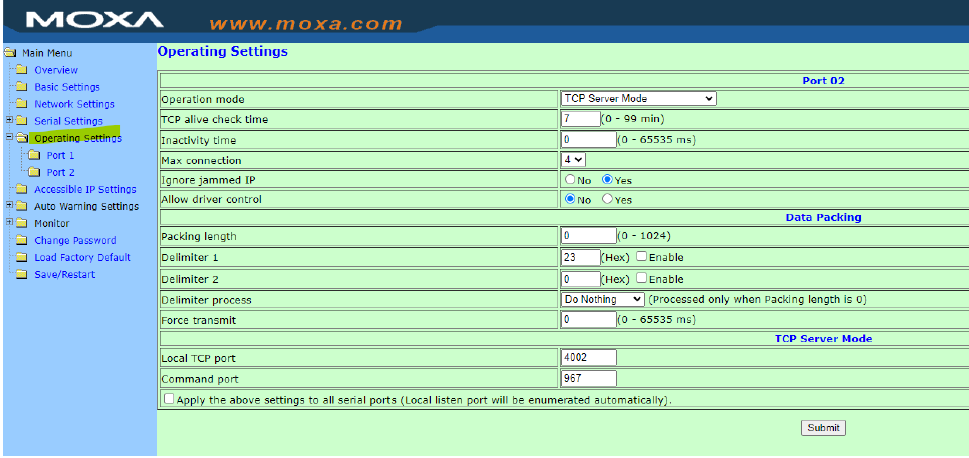
Configure the Operating settings of moxa module via its web interface
Operation mode: TCP Server Mode
Local TCP port: 4002
Max connection: 4
Delimiter 1: 23
Ignore jammed ip: yes
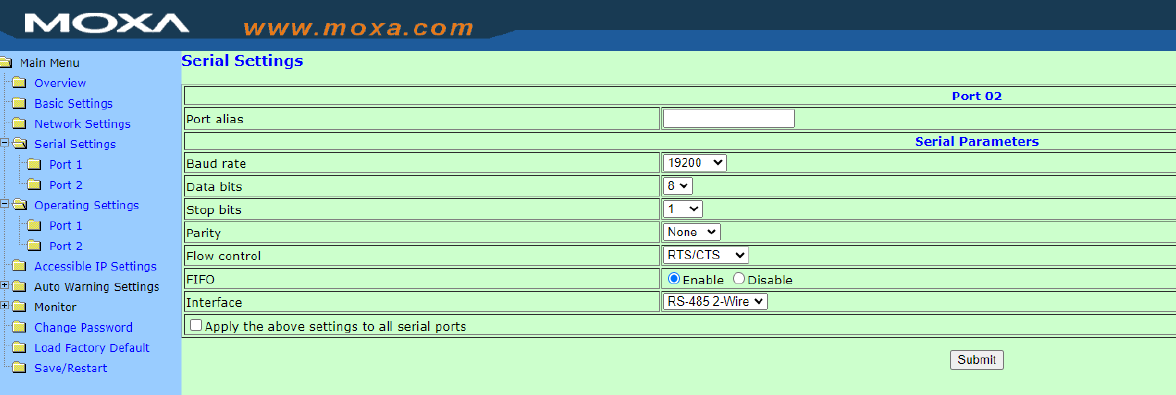
Configure the Serial settings of moxa module via its web interface
Baudrate: 19200
Data bits: 8
Stop bits: 1
Parity: None
Flow control: RTS/CTS
Fifo: Enable
Interface: RS-485 2-Wire
Add a gen2 device to the device module in ALIOT webportal
Device type: AP286 / AP338 / AP298
Interface: tcp/Ip
IP address: het IP address of the moxa module
IP Port: 4002 (default)
Port: /tmp/port0 (moxa serial port)
Serialnumber: serialnumber of the gen2 device
RS485 Address: RS485 address of the gen2 device
check ‘Activated’ checkbox
Note
Always start with /tmp/port0 as Port for the devices attached to the first moxa module. Select port /tmp/Port1 for the second moxa module, and repeat this for other moxa modules.
Never give 2 devices the same RS485 address on the same rs485 bus connected to the moxa module (module serial port)
Troubleshooting
Check you communication with the Gen2Manager tool using a separate moxa module (mapped to your pc with nport admin)
Use the ‘health check’ button in the device module info panel in the ALIOT portal, to test if the gateway can communicate with the gen2 device
Use the Detect Port command in the device module command panel to check if the moxa serial ports are available on the gateway
Restarting the device module via the device module command panel may be required after configuring a new gen2 device to enable connection with the recently created moxa serial port