Barrier - Alphatronics DBK Configuration
In ALIOT portal add a DBK device to the device module.
Add an IP address
Add a port (default 52719)
Configured the DBK (can be done with the help of the configuration push button on the DBK)
Change the IP settings in the DBK (P210-241) : IP address + TCP Port, Subnet, Gateway
To receive messsage from the induction loop inputs, configure the induction loop modes accordingly (P700 sequence)
To be able to set the outputs, configure the operating modes for multi-functional relay accordingly (P5001-506 sequence, display 11: bus relay)
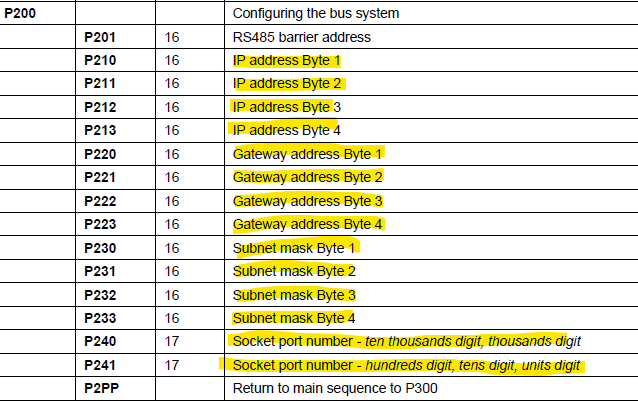
(ip settings)
Attention
An extra IP module must be plugged in, for the DBK to be able to communicate through TCP/IP.