Indicators
Indicators are hardware resources on a device that ‘indicate’ an event or action happening on the device:
Eg:
Buzzer
LEDs
Vibration
Set one or more indicators
Sets the indicators to a desired (logical) state.
URL parameters
hostIp: ip address of the API host.
deviceId: id of the device.
URL body
Array with indicators, each with their desired action and possible value(s). To be able to support all action types on a specific indicator, the following generic parameters are used for each indicator:
state (integer) : possible values : 1,2,3 or 4
1 : Set / Set Pulse : persistent set to a value or set to a value for a certain time
2 : Reset : persistent set to value 0
3 : Toggle: persistent set to previous value
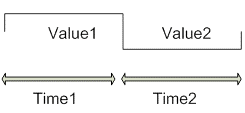
4 : Interval: repetitively set to either value1 or value2 for a certain time
name (string) : this property is important for the led, the number in the name specifies the led to call (ex. LED1 –> will call the first led on the device, LED2 –> …)
value1 (integer) : 0 or >0
time1 (integer) : time in ms. Value may be 0 or >100 [100,65635]
value2 (integer) : 0 or >0
time2 (integer) : time in ms. Value may be 0 or >100 [100,65635]
type (integer) : possible values : 1,2
1 : Buzzer: handle buzzer of device
2 : Led: handle led of device
The possible values of value1 and value2 depend on the type of indicator.
BUZZER: [0,1] for value1/value2
LED: RGB value with:
RGB3: 3bytes long => 1 byte / color ( possible values: 0x00 or 0xFF),
b0=blue,
b1 = green
b2= red
RGB24: 3bytes long => 1 byte / color ( possible values: 0x00 … 0xFF),
b0=blue,
b1 = green
b2= red
The table below specifies the values for Value1, Time1, Value2, Time2 related to the State property
State |
Value1 |
Time1 |
Value2 |
Time2 |
Result |
Reset |
x |
x |
x |
x |
indicator off |
Toggle |
x |
x |
x |
x |
Indicator set to previous value |
Set |
>0 |
0 |
0 |
0 |
Set persistently to Value1 (possible values depend on indicator and vendor type) |
Set |
>0 |
1000 |
0 |
0 |
Set to Value1 for 1000ms, then persistent set to value 0 (Set Pulse, possible values depend on indicator and vendor type) |
Set |
0 |
0 |
>0 |
>0 |
Not supported |
Interval |
>0 |
1000 |
>=0 |
1000 |
Set to Value1 for 1 second, then set to Value2 for 1 second and repeat this endlessly. (possible values depend on indicator and vendor type) |
Note
Note that the actual values depend on the device itself. Go to supported devices to learn about the supported values for a specific device.
- POST https://{hostIp}:7081/hal/devices/{deviceId}/indicators
Example request:
POST /hal/devices/stid1/indicators HTTP/1.1
Accept: application/json
Authorization: Bearer eyJhbGciOiJS...

[
  {
      "name": "LED1",
      "state" : 1,
      "value1" : 1,
      "time1" : 0,
      "value2" : 0,
      "time2" : 0,
      "type" : 2
  },

  ...

  {
      "name": "BUZZER1",
      "state" : 1,
      "value1" : 1,
      "time1" : 1000,
      "value2" : 0
      "time2" : 0,
      "type" : 1
  }
]
Example response:
HTTP/1.1 200 OK
Content-Type: application/json; charset=utf-8
- Status Codes:
200 OK – OK
400 Bad Request – Bad Request. A descriptive error comes along with this error.
401 Unauthorized – Unauthorized. Something is wrong with the Authorization header of the request
403 Forbidden – Forbidden. Something is wrong with the claims of the user.
500 Internal Server Error – Internal Server Error
- Response Headers:
Content-Type – defines the serialization format for the response body (this depends on the Accept header of the request)